SEO
The 7 SEO mistakes that keep your page off the first result
6 min read
The all-in-one platform: describe your restaurant and FlyB's AI builds your complete website — with Google Calendar booking, Stripe checkout, forms and native CRM. No coding skills needed, free to start.
Describe your restaurant — watch AI write, design and publish your website.
Your professional website created in seconds—with forms, pricing tables, and more, no coding required.
Publish two or more versions of the same page on the same link: every visitor sees one, always the same one, and the numbers tell you which version sells more.
Launch a blog and publish posts optimized for Google and AI search, pulling in organic traffic every month without hiring a writer.
Track visits to your pages, calendars and forms in real time with geolocation, and see exactly what converts.
Turn visitors into customers with high-converting pages and a built-in Stripe checkout: payment happens on the page and lands straight in your account.
24/7 booking calendar synced with Google Calendar: clients schedule appointments directly on your page.
A floating button on every page that captures name and phone before opening the chat, so the lead reaches your CRM even if they never message you.
Create short links, WhatsApp links and QR Codes wired into your Analytics: see every click and every scan, and change the destination without reprinting the code.
Track contacts through every funnel stage and let automations move, notify and follow up on each lead at exactly the right moment.
See which funnel stage each lead is lost at and compare the journey by source, campaign or owner — so you know where to act before spending more on ads.
Send automated offers and reminders to your audience using ready-made, easy-to-customize templates.
Find potential customers through Google Maps and Google Places, with phone and address, and send the contacts straight to your CRM.
Generate videos on the most advanced AI models, unlimited on any paid plan: you bring your own OpenRouter key and pay only for what you generate.
Generate images on the most advanced AI models, unlimited on any paid plan: you bring your own OpenRouter key and pay only for what you generate.
Our AI doesn't just deliver a pretty template. It understands your niche, finds professional images and writes conversion-focused copy. You build your website yourself, no developer needed: 100% functional, SEO-optimized and ready to receive traffic in less than 1 minute.
The Lead lands on your AI-generated page.
Fills out the form or books an appointment.
CRM fires a welcome email/WhatsApp automatically.
Lead completes the purchase via Stripe on the pricing table.
Contact becomes a "Client" and enters your retention flow.
One line describing the business goes in. A finished page — copy, images, sections and checkout — comes out. No edit was cut from this recording.
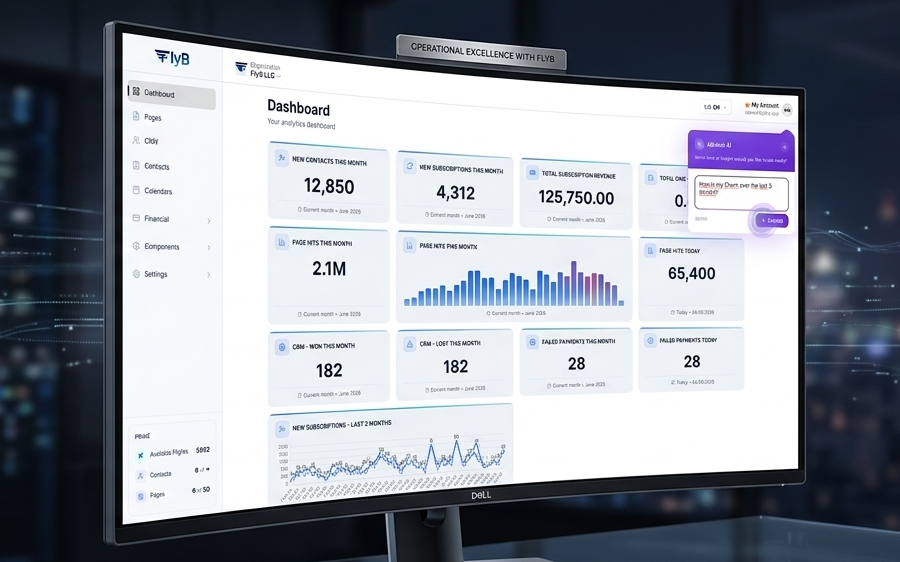
Customize your Dashboard with the KPIs that truly matter for your organization. Track conversion rates, booking volumes and revenue in real time. All powered by native Analytics that shows you exactly where your best clients come from.
Launch as many blogs as your restaurant needs — each one with its own address, category tree, theme and ad space. Write in Markdown, schedule the publication and let SEO work for you.
Categories
Your banner here
The 7 SEO mistakes that keep your page off the first result
How to write a headline that actually converts
Switch blogs and layouts above — that is exactly how it works inside FlyB.
Create one blog per brand, product or client. Each one with its own address, logo, colors and settings — all managed from the same dashboard.
Organize your content in two levels. Opening a category lists its posts plus every post from its subcategories, with live counters in the sidebar.
Pick a visual style, set your palette, logo and favicon, and choose whether the home shows posts as a grid, a list or a magazine. No code involved.
Five ad slots across the home and the posts, with separate desktop and mobile artwork, a scheduling window and view and click tracking on every banner.
FlyB is the orchestrator: one screen drives every AI video generation model available on OpenRouter. You connect your own OpenRouter key and pay OpenRouter directly for what you generate — so there is no credit pack to buy from us and no cap on how many videos you make.
Your own OpenRouter account is billed, at OpenRouter prices. FlyB adds nothing on top and takes no cut of the generation.
Generating video never touches your monthly AI credits. Any paid plan unlocks the generator, with no limit on how many videos you make.
Every call goes straight from your browser to OpenRouter. The key, your frames and your prompts never touch a FlyB server.
Three things stand between a reference image and a video that actually looks intentional. FlyB handles all three.
Choose the first and the last frame of your video. FlyB crops both to the exact aspect ratio the model is about to render, so nothing reaches the model letterboxed, stretched or off-centre.
A vision model looks at the images you picked and turns a one-line brief into a production-ready cinematography prompt — subject, wardrobe, light, camera movement and how the shot travels from the opening frame to the closing one.
Start it and leave the screen. FlyB drives the job, reports each status back as it happens, and keeps every finished video in your history, ready to download.
Included in every paid plan. Past the subscription you pay only OpenRouter, only for what you generate.
Everything you need to sell online in one place. No hidden fees.
Flights are FlyB credits — they power AI generations and sales. Bookings and e-mails have their own monthly allowance.
Prices in US dollars (US$). Cancel anytime, no lock-in.
Publish your page today
Perfect for validating your first idea.
No credit card required
Billed US$US$ 29 monthly
For entrepreneurs professionalizing their sales.
Cancel anytime. No lock-in.
Built to scale
Billed US$US$ 79 monthly
Total scale and freedom with AI-powered creation.
Everything in Plus, plus:
Unlimited sales and bookings, 20,000 e-mails per month.
Cancel anytime. No lock-in.
Secure payments processed by the world-leading online payment platform.
Your data and your customers' data protected with end-to-end encryption.
Optimized for marketing teams that need fast launches.
Cancel anytime. No lock-in. · No credit card required
Everything you need to know before creating your sales page with FlyB.
FlyB is an AI-powered all-in-one business platform for small businesses, agencies, and entrepreneurs. It lets you create AI-generated sales pages and landing pages, capture leads with smart forms, manage a native CRM, accept Stripe payments, send automated email marketing, schedule bookings, and track performance with native analytics — all without writing a single line of code.
With FlyB's generative AI engine, you can create and publish a fully functional, SEO-optimized sales page in under 1 minute. The AI automatically searches for professional images, writes conversion-focused copy, and structures the entire page — you just describe your business.
Yes. FlyB has native Stripe integration. Connect your Stripe account in one click and add a pricing table or checkout button directly to your sales page. This lets you sell products, plans, and subscriptions without leaving FlyB or paying additional transaction fees to a third-party tool.
Yes. FlyB includes a fully native CRM. Every form submission, appointment booking, and payment automatically creates or updates a contact record. You can manage your full sales pipeline, apply custom contact filters, and trigger automated email sequences — all from the same platform where you built your page.
Yes. FlyB includes built-in email marketing automation. You can set up welcome sequences, drip campaigns, and promotional blasts that trigger automatically when a lead fills out a form, completes a booking, or purchases a product — no third-party email tool required.
Yes. FlyB includes native analytics built directly into every page and your CRM dashboard. Track page views, form conversions, booking volumes, revenue, and lead acquisition sources in real time — without needing Google Analytics or any external tool.
FlyB is designed for small business owners, solo entrepreneurs, freelancers, and marketing agencies who need to get online fast and start selling without technical complexity. It is particularly effective for service providers, coaches, consultants, clinics, and sellers of digital or physical products.
Yes. FlyB offers a free plan (Check-in) that lets you create your first sales page, manage CRM contacts, and use Flights (AI credits) to get started — no credit card required. Paid plans unlock custom domains, Stripe checkout, more pages, more contacts, and advanced email automation: Plus starts at $29/month and Prime at $97/month (or less on annual billing).
Yes. Starting from the Plus plan, you can connect your own custom domain to your FlyB sales pages. This removes FlyB branding and lets you present a fully branded, professional experience to your customers.
Unlike traditional drag-and-drop builders such as Wix, Carrd, Squarespace, or Webflow and platforms like Systeme.io and GoHighLevel, FlyB uses generative AI to build your entire website — copy, images, and structure — from a simple text description. It also combines a website builder, native CRM, email marketing, Google Calendar booking, Stripe checkout, and analytics in one single subscription: an all-in-one alternative to juggling multiple tools.
With FlyB you build your website yourself, no developer needed: describe your restaurant in one sentence and the AI writes the copy, finds professional images, and assembles every section automatically. Then just fine-tune colors and content in the visual editor and publish — the whole process takes under 1 minute and requires zero technical knowledge.
Yes. You create a website with booking and Google Calendar in a few clicks: connect your Google account, set your available hours, and clients schedule directly on your page. Every booking syncs to your Google Calendar, becomes a CRM contact, and can trigger automatic email reminders.
Yes. On the free plan you create your first landing page (or sales page) for free, with a lead capture form wired to the CRM — no credit card required. To use a custom domain and enable Stripe checkout, simply upgrade to a paid plan whenever it makes sense for your restaurant.
Yes. Every paid plan includes the AI video generator, with no limit on how many videos you create. FlyB acts as the orchestrator of the video generation models available on OpenRouter: you connect your own OpenRouter key, and OpenRouter bills you directly for what you generate — FlyB adds no markup and spends none of your monthly Flights. The module crops your first and last frame to the exact format the model will render, reads those images to write the cinematography prompt for you, and runs the generation in the background.
You choose from the video generation models available on OpenRouter — the catalogue is read live from your own account, so a new model shows up as soon as OpenRouter publishes it. FlyB only leaves out the ones that cannot generate audio. The cost is whatever OpenRouter charges for the model, duration and resolution you picked, billed to your own OpenRouter account with na FlyB markup on top.
A restaurant’s site is read on a phone, usually within a mile of the door, and it needs to answer three things fast: are you open, where are you, and can I book.
You describe the business in a few sentences and the AI writes the copy, picks the section order, sources the images and fills the SEO fields. Edits go to a draft, so the published page never changes mid-thought.
Hero, features, content, gallery, pricing, testimonials, FAQ, stats, form, CTA and a custom HTML block — typed blocks you move, restyle or regenerate one at a time.
Every AI edit is written to a draft. The published page changes only when you publish it, so you can leave something half-finished without anyone seeing it.
Hours, address and a booking action above everything else. Anything that delays those is costing a table — the person reading is already hungry and standing somewhere.
A tracked link with a QR Code puts the menu on the table, and because the destination is a database row rather than part of the link, you can change the menu without reprinting anything.
A calendar with covers as appointment types takes reservations while the kitchen is busy, and each one arrives as a contact you can reach for the next event night.